Hmrc Starter Checklist 2019


What is the HMRC Starter Checklist?
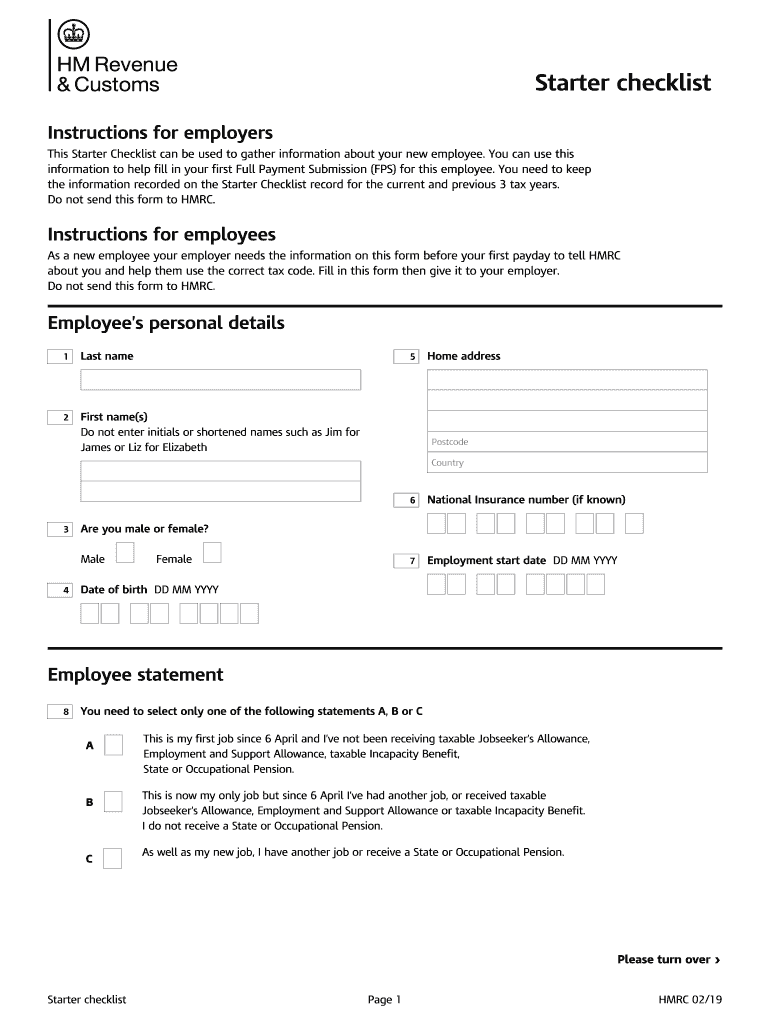
The HMRC Starter Checklist is a crucial document designed for new employees in the United Kingdom. It helps employers gather necessary information to ensure proper tax and National Insurance contributions are made. This checklist is particularly important for individuals who are starting a new job and may not have a P45 form from a previous employer. By completing the checklist, new hires provide details about their tax status and personal information, allowing employers to calculate the correct tax code and deductions.
How to Use the HMRC Starter Checklist
Using the HMRC Starter Checklist involves a straightforward process. First, new employees should obtain the checklist from their employer or download it from the official HMRC website. Next, they need to fill in personal details, including their name, address, and National Insurance number. Additionally, they must indicate whether they have worked before and if they have any other income. Once completed, the checklist should be submitted to the employer, who will use the information to ensure accurate tax calculations.
Steps to Complete the HMRC Starter Checklist
Completing the HMRC Starter Checklist requires careful attention to detail. Here are the steps to follow:
- Obtain the checklist from your employer or download it.
- Fill in your personal details, including your full name and address.
- Provide your National Insurance number, if available.
- Indicate your employment history, including any previous jobs.
- Submit the completed checklist to your employer promptly.
Key Elements of the HMRC Starter Checklist
The HMRC Starter Checklist contains several key elements that are essential for accurate tax processing. These include:
- Personal Information: Name, address, and National Insurance number.
- Employment History: Details of previous employment and any other income sources.
- Tax Status: Information on whether the employee has a P45 or is starting a job for the first time.
Legal Use of the HMRC Starter Checklist
The legal use of the HMRC Starter Checklist is important for both employers and employees. Employers are required to collect accurate tax information to comply with UK tax laws. Failure to do so can result in penalties for incorrect tax deductions. Employees must ensure that the information provided is accurate and truthful, as false information can lead to serious legal consequences.
Required Documents
When completing the HMRC Starter Checklist, employees may need to provide additional documents to support their claims. Commonly required documents include:
- P45 from a previous employer, if applicable.
- Proof of identity, such as a passport or driver's license.
- National Insurance number documentation.
Quick guide on how to complete this starter checklist can be used to gather information about your new employee
A concise guide on how to create your Hmrc Starter Checklist
Locating the suitable template can be difficult when you need to submit official international paperwork. Even if you possess the necessary form, it may be cumbersome to quickly fill it out in accordance with all the stipulations if you utilize paper copies instead of handling everything digitally. airSlate SignNow is the web-based eSignature platform that assists you in overcoming these obstacles. It allows you to acquire your Hmrc Starter Checklist and swiftly complete and endorse it on-site without needing to reprint documents if you make an error.
The following are the steps you must take to create your Hmrc Starter Checklist with airSlate SignNow:
- Tap the Get Form button to upload your document to our editor immediately.
- Begin with the first blank field, input details, and continue using the Next tool.
- Complete the empty spaces with the Cross and Check functionalities from the toolbar above.
- Choose the Highlight or Line options to emphasize the most important information.
- Click on Image and upload one if your Hmrc Starter Checklist requires it.
- Utilize the right-side panel to add more fields for you or others to complete if needed.
- Review your responses and confirm the template by clicking Date, Initials, and Sign.
- Draw, type, upload your eSignature, or capture it with a camera or QR code.
- Complete the form modification by clicking the Done button and selecting your file-sharing preferences.
Once your Hmrc Starter Checklist is ready, you can distribute it as you prefer - send it to your recipients via email, SMS, fax, or even print it directly from the editor. You can also securely store all your completed documents in your account, organized in folders according to your choices. Don’t spend time on manual document filling; try airSlate SignNow!
Create this form in 5 minutes or less
Find and fill out the correct this starter checklist can be used to gather information about your new employee
FAQs
-
How do I get started using Quora?
1. Quora works by having the community ask and answer questions. When you want to know more about something, Quora delivers you answers and content from people who know the answer - like real doctors, economists, screenwriters, police officers, and military veterans.Ask questions when you have them. Here is more info on how to get your questions answered: What are some good ways to get people to answer my questions on Quora?Answer questions when you can!2. Use your feed and tell Quora what you're interested in reading.Your feed is filled with stories that interest you. You can view your feed by going to the home page.Build a good feed by following topics and people, and taking actions in feed that tell Quora what you like. For more on this, see: How do I personalize my Quora feed?Topics: When you follow a topic, questions and answers tagged with that topic will appear in your feedPeople. When you follow people, you will see questions and answers posted by these people in your feed.The easiest first step: start by following some topics that you care about and some people who write about them.You can also read some interesting questions and popular answers to get a feel for the site.3. Upvote answers that you think are helpful.When you see a good answer on Quora, upvote it.Your votes help people see good answers and make Quora better.You can learn more here:What are some frequently asked questions for new Quora users?What does a good question on Quora look like?What does a good answer on Quora look like? What does it mean to "be helpful"?
-
Can my mobile phone be used to gather information about me by advertisers or government agencies and is this going on?
Yes, yes, and it’s been going-on since Google started using the playstore settings options and is automatically turned-on when you setup any new Android device unless you deliberately look for and deselect the opt out of customized advertising options on the device under your account settings. The sad thing is that most programs you install are doing this in exchange for getting their free software, with no choice to opt-out in most cases, even when you buy their full program. It’s been going-on since before Android was first released, and was present even in Windows and Symbian platform products.This is the reality of the new generation of devices, operating system settings, program choices, and there’s little recourse for the consumer to do otherwise than to be aware of what they’re doing online all the time.Browser cookies are stored on your devices and used to track your movement, browsing choices, IP location information, and so forth. In many cases you have no choice but to consent or not be able to use their platform, their website, or their programs. Nice.It brings a whole new meaning to the 70s phrase from Russsia that “big brother is always watching you comrade”. The only difference is that back then and now it’s still considered illegal and punishable, but back then no one could or would ever be held accountable.
-
Can I use Google Earth to see new public roads being constructed this year around the planet? If not, how can I find out about planned roads?
Your state highway department is where to go for your state highway projects. Google Earth is a Google project.The Wisconsin Department of Transportation has a booth every year at the Wisconsin State Fair complete with a cool model layout. Those who are directly impacted by changes and the construction schedule are notified to prepare for temporary inconveniences.Take a look at my state's projects.Wisconsin 511 Construction ProjectsGoogle Earth would be the last place to visit for highway projects other than curiously checking for any updates. It's created from individual snapshots of the landscape. Look at the individual frames for image dates to determine how recent the images are.The Zoo Interchange project began with modifications to Greenfield and an exit ramp towards the medical complex along with a long overdue bridge replacement. Last year ended with the completion of Watertown Plank, Hwy 100 and Swan Blvd so it was a nice Christmas present to be able to use a few new exits and entrances.Two successfully completed projects include the Marquette Interchange and the interchange connecting I-43 & I-894 near the airport. It took some getting used to with both new interchanges but they make more sense.I think that GPS keeps up with the changes, but I have no idea now current that is. I tried navigating through a construction zone with GPS back in August 2013 through Louisville, KY. It did not help me other than getting me out of missing my southbound I-65 connection.I would not use Google Earth to research highway projects. Google Earth is a cool Google project for exploring the Earth. You get your highway project information from your state government website or office. At least ours does public exhibitions.
-
Can I collect information on a topic from multiple authors and write a book about all the information I gathered without using their exact texts? Would this be plagiarizing? Do I need to cite?
Much depends on how you present the collected information. If the document is presented as a literature survey it’s an accepted approach. You should still list the sources, preferably with standard citations so readers can follow-up. This type of survey adds no (or little) content value but can save other researches time in finding existing research and source documents.Another type of document would be an analysis of the collected documents. This analysis could be in a number of contexts, from linguistic analysis, trending topic studies, individual author bibliographies, to content comparison and analysis between/among sets of authors or topics. Same point on citations as above.Then there’s the case where you generate new information from synthesis, extension, or other research directly based on one or more of the sources. This is a creative process and should include properly attributed excerpts and citations to back up your sources and new information theories or conclusions. True original insights obviously are not plagiarism but there can be a fine line depending on the definitions of scope and originality. Make sure your claims of originality are just that not just a rehash or obvious combination of source material.In any case, if you’re referencing, directly or indirectly, the work of another party, follow proper attribution and citation rules for your domain. It’s usually not necessary to follow-up and cite secondary sources but primary sources used in creating your document are best acknowledged, never claimed as your own, even by implication, and ensure any excerpts are handled properly, particularly for copyrighted and licensed materials — some may require explicit permission to use in a different context. Most of this is just common sense and polite behavior among researchers and authors.
-
The Earth's atmosphere extends far past the moon according to new research. How can this new information be used to further our understanding?
There are two different boundaries identified that delineate the atmosphere from outer space. One of them deals with the ability to conduct aerodynamic flight. The National Aeronautics and Space Administration defines the limit up arrow dynamic flight as 50 miles. The Kármán line is defined at 62 Miles for the same purpose. Above that limit, an aerodynamic aircraft would have to fly faster than normal velocity in order to generate sufficient lift from the thin atmosphere.The other definition of the atmosphere is scientific. The farthest signNowing layer of the Earth’s atmosphere is called the exosphere, and its limit is about 10,000 km. Beyond that point, the solar wind prevents any structure identifiable as atmospheric.I don’t know where you obtained your information regarding the atmosphere extending as far as you mentioned, and I looked for it, found nothing, so I’m not sure that is true. Could you share your information with me?
-
What do you guys think about dropshipping in 2018? I'm new in this and I want to gather as much information as I can. I'm thinking about buying a domain, looking for the hottest products right now, and start using Facebook Ads for traffic.
Hey dude, good question. I recently answered a question like this so this is a copy but this applies to you too :)Truth is there are many different strategies that work.Facebook ad’s, Instagram, google ads.But at the heart of it comes the product and the product photos. (little tip, buy the items and take photos of them yourslef!)That is the first step (also one the most important!)ProductIdeally, you want to find something that is :1 - Working already2 - Has a use or solves a problem.You can find this out by going to facebook and entering keywords like “% off” or “get it now”. What this will do is search Facebook for post using these words. Mostly all of them will be dropshipping products.So choose results in the last month then find items that have lots of comments and shares!Or if you want a really easy and quick way of doing this use Pexda. It’s bloody great for saving time and giving you what’s working right now.Then identify the target audience and run some ads!Obviously there is a bit more too it than that but this is one of the most important steps. The look of the site and things like that come into it a bit but this is the thing that will make you money!I would suggest using Shopify, it’s so easy to use and design a store on! (14 day free trial).Good luck dude. Keep going. This shit can change your life!
Create this form in 5 minutes!
How to create an eSignature for the this starter checklist can be used to gather information about your new employee
How to generate an electronic signature for the This Starter Checklist Can Be Used To Gather Information About Your New Employee in the online mode
How to generate an electronic signature for your This Starter Checklist Can Be Used To Gather Information About Your New Employee in Chrome
How to create an electronic signature for signing the This Starter Checklist Can Be Used To Gather Information About Your New Employee in Gmail
How to make an electronic signature for the This Starter Checklist Can Be Used To Gather Information About Your New Employee straight from your smartphone
How to make an electronic signature for the This Starter Checklist Can Be Used To Gather Information About Your New Employee on iOS devices
How to make an eSignature for the This Starter Checklist Can Be Used To Gather Information About Your New Employee on Android OS
People also ask
-
What is the HMRC Starter Checklist and how can it benefit my business?
The HMRC Starter Checklist is a crucial tool for new businesses in the UK, helping ensure compliance with tax obligations. By utilizing the checklist, you can easily understand the necessary steps to register for tax and set up your business correctly. Integrating this checklist with airSlate SignNow enhances your document management process, making it easier to handle important paperwork efficiently.
-
How can airSlate SignNow help me with the HMRC Starter Checklist?
airSlate SignNow streamlines the process of managing your HMRC Starter Checklist by allowing you to eSign and send documents securely. Our platform enables you to create, sign, and store your compliance documents all in one place. This not only saves time but also ensures that your business remains compliant with HMRC regulations.
-
What features does airSlate SignNow offer for managing the HMRC Starter Checklist?
airSlate SignNow offers a range of features tailored for managing the HMRC Starter Checklist, including electronic signatures, document templates, and automated workflows. These features make it easy to assemble and edit your checklist quickly and ensure all necessary documents are signed and stored securely. This helps you maintain organization and compliance as your business grows.
-
Is airSlate SignNow a cost-effective solution for handling the HMRC Starter Checklist?
Yes, airSlate SignNow is designed to be a cost-effective solution for businesses of all sizes. With various pricing plans available, you can choose one that fits your budget, ensuring you can manage your HMRC Starter Checklist without breaking the bank. Our platform helps reduce administrative costs associated with document management.
-
Can I integrate airSlate SignNow with other tools to manage the HMRC Starter Checklist?
Absolutely! airSlate SignNow offers seamless integrations with various business tools that can help you manage your HMRC Starter Checklist more effectively. Whether you use accounting software, CRM systems, or project management tools, our platform can connect with them to streamline your workflow and improve efficiency.
-
What types of businesses can benefit from using the HMRC Starter Checklist with airSlate SignNow?
Any new business in the UK can benefit from using the HMRC Starter Checklist with airSlate SignNow. Startups and small businesses looking to establish compliance with tax regulations will find our solution particularly useful. Our user-friendly interface makes it easy for all types of businesses to manage their paperwork efficiently.
-
How secure is airSlate SignNow when handling my HMRC Starter Checklist documents?
Security is a top priority at airSlate SignNow. We employ advanced encryption methods and adhere to strict compliance standards to ensure that your HMRC Starter Checklist documents are protected at all times. You can trust that your sensitive information remains confidential and secure while using our platform.
Get more for Hmrc Starter Checklist
Find out other Hmrc Starter Checklist
- How Can I Electronic signature Tennessee Legal Warranty Deed
- Electronic signature Texas Legal Lease Agreement Template Free
- Can I Electronic signature Texas Legal Lease Agreement Template
- How To Electronic signature Texas Legal Stock Certificate
- How Can I Electronic signature Texas Legal POA
- Electronic signature West Virginia Orthodontists Living Will Online
- Electronic signature Legal PDF Vermont Online
- How Can I Electronic signature Utah Legal Separation Agreement
- Electronic signature Arizona Plumbing Rental Lease Agreement Myself
- Electronic signature Alabama Real Estate Quitclaim Deed Free
- Electronic signature Alabama Real Estate Quitclaim Deed Safe
- Electronic signature Colorado Plumbing Business Plan Template Secure
- Electronic signature Alaska Real Estate Lease Agreement Template Now
- Electronic signature Colorado Plumbing LLC Operating Agreement Simple
- Electronic signature Arizona Real Estate Business Plan Template Free
- Electronic signature Washington Legal Contract Safe
- How To Electronic signature Arkansas Real Estate Contract
- Electronic signature Idaho Plumbing Claim Myself
- Electronic signature Kansas Plumbing Business Plan Template Secure
- Electronic signature Louisiana Plumbing Purchase Order Template Simple